Best High Power Wi-Fi Range Extenders for Large Properties
The best high power Wi-Fi range extenders for large properties are the NETGEAR Nighthawk EAX80 for demanding indoor coverage, the TP-Link RE715X for most Wi-Fi 6 homes, and an IP-rated outdoor extender for detached buildings, gardens, workshops, or pool areas.
The right choice depends less on the biggest advertised square-foot figure and more on four practical limits: the signal reaching the extender, the speed your router can supply, the number and thickness of walls between rooms, and whether the unit must survive outdoor conditions.
Our top picks
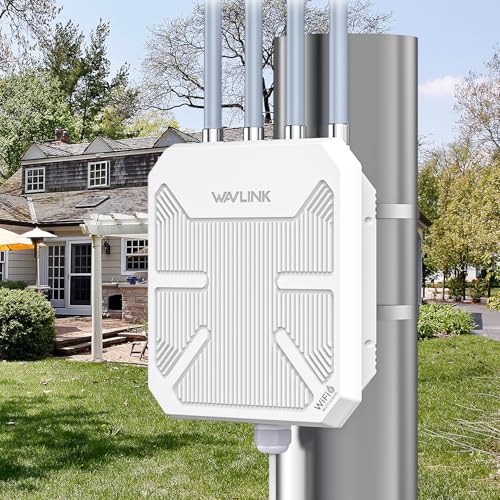 2026 WAVLINK AX3000 Outdoor WiFi 6 Extender
- 【About After Sales】: Please feel free to contact…
- 【Enjoy True AX3000 WiFi 6 Speed】The next generation…
- 【Long Range WiFi Coverage】The upgraded 4x 8dBi omni-directional…
 BrosTrend AC1200 Outdoor WiFi Extender Long Range
- Reliable Outdoor WiFi: Stay connected, rain or shine!…
- Extend Your WiFi Coverage: The WiFi extender signal…
- Blazing-Fast AC1200 Dual-Band WiFi: The long range WiFi…
 WAVLINK AC1200 Outdoor WiFi Range Extender
- 【𝐀𝐛𝐨𝐮𝐭 𝐀𝐟𝐭𝐞𝐫 𝐒𝐚𝐥𝐞𝐬】: 𝐏𝐥𝐞𝐚𝐬𝐞 𝐟𝐞𝐞𝐥 𝐟𝐫𝐞𝐞 𝐭𝐨 𝐜𝐨𝐧𝐭𝐚𝐜𝐭…
- 【High-Speed Dual-Band Wi-Fi 6 Support】Enjoy seamless 4K streaming,…
- 【Extended Wi-Fi Coverage with High Gain】Equipped with 4…
| Product | Key specs | |
|---|---|---|
| 2026 WAVLINK AX3000 Outdoor WiFi 6 Extender | 【About After Sales】: Please feel free to contact… 【Enjoy True AX3000 WiFi 6 Speed】The next generation… 【Long Range WiFi Coverage】The upgraded 4x 8dBi omni-directional… | Check price |
| BrosTrend AC1200 Outdoor WiFi Extender Long Range | Reliable Outdoor WiFi: Stay connected, rain or shine!… Extend Your WiFi Coverage: The WiFi extender signal… Blazing-Fast AC1200 Dual-Band WiFi: The long range WiFi… | Check price |
| WAVLINK AC1200 Outdoor WiFi Range Extender | 【𝐀𝐛𝐨𝐮𝐭 𝐀𝐟𝐭𝐞𝐫 𝐒𝐚𝐥𝐞𝐬】: 𝐏𝐥𝐞𝐚𝐬𝐞 𝐟𝐞𝐞𝐥 𝐟𝐫𝐞𝐞 𝐭𝐨 𝐜𝐨𝐧𝐭𝐚𝐜𝐭… 【High-Speed Dual-Band Wi-Fi 6 Support】Enjoy seamless 4K streaming,… 【Extended Wi-Fi Coverage with High Gain】Equipped with 4… | Check price |
 WAVLINK WiFi 7 BE5100 Outdoor WiFi Extender | Dual Band 802.11BE Standard WiFi 7 with 4-Stream:… Long Range WiFi Coverage up to 300 meters:… Active & Passive POE Support: Empower your outdoor… | Check price |
As an Amazon Associate we earn from qualifying purchases at no extra cost to you.
Quick recommendations by property and use
| Situation | Best fit | Why | Important limitation |
|---|---|---|---|
| Large house with many indoor devices | NETGEAR Nighthawk EAX80 | Wi-Fi 6, dual-band operation, four Ethernet ports, and a powerful desktop design | Needs a strong source signal and costs more than basic extenders |
| Medium-to-large home upgrading from Wi-Fi 5 | TP-Link RE715X | Wi-Fi 6, OneMesh support with compatible TP-Link routers, and a compact plug-in format | One Ethernet port and less flexibility for wired equipment |
| Older Wi-Fi 5 router on a moderate budget | TP-Link RE550 or a similar AC-class dual-band extender | Broad compatibility and a lower purchase price | Wi-Fi 5 capacity is less suitable for many simultaneous high-speed devices |
| Detached garage, barn, patio, or garden office | IP65-rated outdoor extender or outdoor access point | Weather-resistant housing, mounting options, and better tolerance of dust and moisture | Usually requires protected power and careful placement; indoor units are not substitutes |
| Very large or multi-building property | Wired access points or a Wi-Fi mesh system | Ethernet backhaul avoids the major speed loss of a wireless repeater link | Higher installation effort and possible cable or network-switch costs |
1. NETGEAR Nighthawk EAX80: best for maximum indoor capacity
The NETGEAR Nighthawk EAX80 is a strong choice when the property has several rooms, many connected devices, and a reasonably modern router. It is a dual-band Wi-Fi 6 extender with a combined theoretical rate of up to 6,000 Mbps and four Gigabit Ethernet ports. The desktop enclosure is larger than a typical plug-in model, measuring approximately 9.2 by 6.7 by 3.5 inches.
Its main advantage is capacity rather than magical signal penetration. Wi-Fi 6 features such as OFDMA and improved scheduling can help when phones, cameras, televisions, laptops, and smart-home equipment share the extended network. The Ethernet ports also make it useful beside a television, desktop computer, network storage device, or game console.
Choose it when the main router is Wi-Fi 5 or Wi-Fi 6, the extension point has a good 5 GHz signal, and you want several wired connections. It is less attractive for a remote outbuilding because it is an indoor device without an outdoor weather rating.
2. TP-Link RE715X: best balance for most large homes
The TP-Link RE715X is a dual-band Wi-Fi 6 extender with a combined theoretical speed of AX3000: up to 2,402 Mbps on 5 GHz and 574 Mbps on 2.4 GHz. It includes one Gigabit Ethernet port and is designed to work with compatible TP-Link OneMesh routers for a more unified network name and roaming experience.
This is a sensible middle ground for a two-story house, a long single-story property, or a home where the router covers most rooms but leaves dead zones at the far end. Its wall-plug design takes less space than the EAX80, although the antennas and body can block an adjacent socket depending on the outlet layout.
Use 5 GHz for faster laptops, streaming devices, and newer phones when the extender is relatively close to the router. Use 2.4 GHz for longer reach, smart-home devices, and areas separated by dense walls. As with any wireless extender, the advertised combined speed is not the speed one device will normally receive.
3. TP-Link RE550: sensible budget choice for compatible older routers
The TP-Link RE550 is an AC1900-class dual-band Wi-Fi 5 extender, rated at up to 1,300 Mbps on 5 GHz and 600 Mbps on 2.4 GHz. It has three external antennas and a Gigabit Ethernet port. It is compatible with routers from many brands, although advanced mesh-style features generally depend on using compatible TP-Link equipment.
This model makes sense when the existing router is Wi-Fi 5, the broadband connection is moderate, and the goal is dependable coverage rather than the highest possible throughput. It can also be a cost-effective way to reach a bedroom, hallway, or home office that is one or two interior walls beyond the router.
Do not buy an AC-class extender expecting it to turn an older router into a Wi-Fi 6 network. If the property has gigabit internet, numerous simultaneous users, or frequent large file transfers, a Wi-Fi 6 extender or wired access point is a better long-term choice.
When an outdoor extender is the right answer
Indoor extenders should not be installed under a porch, inside a damp shed, or in an exposed garage. For outdoor coverage, choose a product specifically described as outdoor-rated, with a stated enclosure rating such as IP65, operating-temperature information, mounting hardware, and suitable protection for its power connection.
Outdoor extender products, including outdoor AC1200-class units sold by brands such as WAVLINK, are typically designed around 2.4 GHz and 5 GHz radios, directional or adjustable antennas, and wall or pole mounting. Their useful range can exceed an indoor plug-in unit in open space, but the result depends heavily on antenna orientation and the signal available at the mounting point.
A detached building separated by brick, concrete, foil-backed insulation, or metal siding may be better served by a point-to-point wireless bridge or Ethernet cable. An outdoor extender still needs a clean wireless link back to the main router; weather resistance does not overcome severe wall attenuation.
Coverage is a calculation, not just a product claim
Manufacturers’ coverage figures are usually optimistic and may assume open indoor layouts. A useful planning method is to estimate the router’s usable radius, then place the extender where the router still provides a reliable connection.
For example, suppose a router provides dependable service through a 35-foot indoor path. The far end of a property is 90 feet away, with two dense plaster or masonry walls in the route. Placing an extender at the 45-foot point may extend coverage toward the far rooms, but only if the extender receives a stable signal there. Putting it at the 85-foot dead zone gives the extender a poor source signal and usually produces slow, unstable service.
For a long property, two moderate-quality extenders can be better than one maximum-power unit, but do not place them in a chain unless necessary. Each wireless hop adds delay and can reduce throughput. If two extenders are required, connect each directly to the router where possible, or use Ethernet backhaul.
How walls and bands change the decision
- 2.4 GHz: Longer reach and better wall penetration, but more interference and lower practical throughput.
- 5 GHz: Higher speeds and usually less congestion, but shorter effective range through walls.
- 6 GHz: Available on some newer routers and mesh systems, but shorter range and less universal extender compatibility. Do not assume a Wi-Fi 6 product supports 6 GHz; Wi-Fi 6E or Wi-Fi 7 labeling is required.
- Brick, concrete, stone, foil insulation, and metal: These can reduce the useful signal far more than ordinary drywall. A wired access point is often the better solution.
Setup steps that preserve speed
- Update the router and extender firmware. Updates can improve compatibility, security, and stability.
- Place the extender halfway toward the weak area. Start with a location where the router signal is still good, not inside the dead zone.
- Use the 5 GHz band for the backhaul when its signal is reliable. Use 2.4 GHz when distance or walls make 5 GHz unstable.
- Keep it away from metal cabinets, microwaves, thick wiring bundles, and large appliances. These can introduce reflection or interference.
- Test from the actual rooms that matter. Check speed, latency, and connection stability at different times of day rather than testing only beside the extender.
- Use Ethernet backhaul if available. A cable from the router to the extender can make the extended Wi-Fi much faster and more consistent.
Ownership details people often overlook
Extenders do not require consumable filters or routine cleaning, but dust can block ventilation openings and heat can shorten electronic component life. Keep indoor units away from enclosed cabinets and direct heat. Outdoor units need inspection of cable glands, mounting hardware, and weather seals after storms or seasonal temperature changes.
The most common mistake is buying an extender with a higher theoretical speed than the router or broadband connection can use. Another is placing it too far away. A high-power radio can transmit farther, but the return signal from a phone or laptop may be weaker, creating an apparently strong network that performs poorly.
Final buying decision
Choose the NETGEAR EAX80 when you need the greatest indoor capacity and multiple wired ports. Choose the TP-Link RE715X for a balanced Wi-Fi 6 upgrade in a typical large home, especially with a compatible TP-Link router. Choose the TP-Link RE550 when budget and older-router compatibility matter more than Wi-Fi 6 features. For exposed areas, select a genuinely outdoor-rated unit; for multiple buildings or thick masonry, budget for Ethernet, a point-to-point bridge, or wired access points instead of relying on wireless repeating alone.
More from Amazon
Programs that pair well with the guide above. Offers and eligibility are set by Amazon and may change.
Set up recurring deliveries of everyday items on eligible products. Terms and savings are set by Amazon.
Explore Subscribe & SaveFree shipping on eligible items, Prime Video and more. Eligible new members can start with a free trial.
Start a Prime free trialAudiobooks and podcasts to listen to on the go. Eligible new members can start with a free trial.
Try Audible freeRead from a large library of eBooks and audiobooks on any device. Check Amazon for current plans.
Explore Kindle UnlimitedAs an Amazon Associate we earn from qualifying purchases.