Key takeaways
- 5-inch parent-unit display with a dedicated wireless connection to the camera – no Wi-Fi, no app
- Camera with infrared night vision for a dark nursery
- Two-way audio so you can speak without walking to the room
- Rechargeable parent-unit battery; runtime varies with screen brightness and whether the display stays on continuously
- Camera body designed to sit on a shelf or ledge and be angled at the cot
The best smart baby monitor for most families is the Babysense TOUCH 7″ Touchscreen Smart WiFi Baby Monitor. It is the only pick here that ships with two cameras, a 7-inch touchscreen parent unit, a night light and app access in one box, so you get local viewing that never depends on your router plus remote viewing when you are out. If you want the cheapest reliable option and no internet connection at all, the HelloBaby 6″ No WiFi Video Baby Monitor is the pick, and its 30-hour battery claim is the longest in this roundup. If sleep data matters more to you than video, the Owlet Dream Sock tracks sleep patterns without a camera in the room. Everything below is organised around the eight things that actually decide whether you will still like your monitor in eighteen months: video quality, night vision, how the connection is secured, how alerts reach you, sleep tracking, where footage is stored, what privacy controls you get, and whether a subscription quietly raises the real price.
Top 3 Picks
Best overall: Babysense TOUCH 7″ Touchscreen Smart WiFi Baby Monitor
Two cameras, a 7-inch touchscreen and a night light cover the two most common upgrades people buy separately: a second room and a toddler who wants a light on. Because the parent unit works independently of Wi-Fi, a router outage or a slow evening does not blind you, and the app is there when you want to check in from elsewhere.
Best budget: HelloBaby 6″ No WiFi Video Baby Monitor
A 6-inch screen, no app, no account, no subscription and a 30-hour battery claim for the price of a mid-range baby blanket. It does one job, does it without a network connection, and there is nothing to configure at 3 a.m.
Best for sleep tracking: Owlet Dream Sock
This is a wearable, not a camera. It suits parents who want sleep-pattern context rather than another screen to watch, and it works alongside whatever video monitor you already own. It is a general wellness product, not a medical device, and it should never replace medical advice or a paediatrician’s guidance.
Quick Comparison
| Product | Best for | Key specs | Price tier |
|---|---|---|---|
| HelloBaby HB6550 | Simple, no-internet monitoring | 5″ parent screen; no Wi-Fi or app; infrared night vision; two-way audio; rechargeable parent unit | Budget |
| Nanit Smart Baby Video Monitor + Floor Stand | Sleep insights and a standing overhead view | 1080p Wi-Fi camera; floor stand included; app sleep tracking; advanced insights behind a subscription | Premium |
| GoodBaby 5″ Monitor | A second nursery or a backup unit | 5″ screen; no Wi-Fi; night vision; audio; plug-and-play pairing | Budget |
| Dr.Care VistaView 5″ | Travel and clip-on placement | 5″ 1080p; Wi-Fi with app; clip mount for cots, shelves and pack-and-plays | Mid-range |
| Momcozy Smart WiFi Monitor | Tidy wall-mounted installs | 5″ 1080p; Wi-Fi with app; wall mount included; audio | Premium |
| VTech Smart WiFi Monitor | Free app access to a 1080p pan camera | 1080p camera; 5″ screen; pan and tilt; free app, no subscription tier | Mid-range |
| Babysense TOUCH 7″ | Best overall – two rooms, one box | 7″ touchscreen; two cameras; night light; Wi-Fi plus independent parent unit | Premium |
| Owlet Dream Sock | Sleep tracking without a camera | Wearable sock; app sleep trends; no video; general wellness product | Premium |
| Jartoo 2K Hybrid Monitor | Hybrid local plus remote viewing | 2K-class camera; 5.5″ screen; switches between Wi-Fi and direct no-Wi-Fi mode; mount included | Mid-range |
| HelloBaby 6″ No WiFi | Longest-rated battery on a budget | 6″ screen; no Wi-Fi; 30-hour battery claim; night vision; audio | Budget |
| Philips Avent Premium Connected | Brand-name reliability with a 5″ HD screen | 1080p camera; 5″ HD parent screen; app connectivity; audio | Mid-range |
| HelloBaby 4.3″ No WiFi | Smallest footprint and travel | 4.3″ screen; no Wi-Fi; 30-hour battery claim; night vision | Budget |
How We Chose
This roundup is built from published product specifications, brand documentation and the practical realities of how nursery monitoring is used night after night. We did not test, benchmark or own any of these units; every judgement here comes from the specifications each manufacturer publishes and from how those specifications map onto real household situations.
The selection criteria were deliberately narrow. First, category fit: a monitor has to be either a dedicated video system with its own parent unit, a Wi-Fi camera with app viewing, or a wearable sleep tracker – and it has to be honest about which one it is, because a Wi-Fi-only camera with no parent unit is a poor choice for someone who wants zero dependence on a router. Second, spec transparency: we favoured products whose listing names state their resolution, screen size and battery claims, since those are the three numbers that determine daily satisfaction. Third, subscription burden: a monitor that gates its most useful features behind a monthly fee is a different purchase from one that does not, so we flagged which products have a paid tier and which keep the core experience free. Fourth, privacy and storage design, meaning whether footage lives on a local card, in the cloud, or nowhere at all. Fifth, upgrade path: whether the system can grow to a second child, a second camera or a move to a bigger house without replacing the whole kit.
1. HelloBaby HB6550 – Best for a Simple, No-Internet Setup
As an Amazon Associate we earn from qualifying purchases at no extra cost to you.

The HB6550 is the monitor to buy when you want a nursery camera that never touches your home network. There is no app, no account, no firmware update, no cloud clip and no monthly fee – the parent unit and camera talk to each other on a dedicated wireless link, and that is the entire system. For a lot of families, especially those who have already been unsettled by headlines about connected cameras, that simplicity is the feature.
It suits first-time parents who want to be operational within five minutes of opening the box, grandparents who need a monitor at their house without managing another login, and anyone who wants a second unit for a guest room or a playroom without adding more devices to the router.
Key specs
- 5-inch parent-unit display with a dedicated wireless connection to the camera – no Wi-Fi, no app
- Camera with infrared night vision for a dark nursery
- Two-way audio so you can speak without walking to the room
- Rechargeable parent-unit battery; runtime varies with screen brightness and whether the display stays on continuously
- Camera body designed to sit on a shelf or ledge and be angled at the cot
Strengths
The strongest argument for the HB6550 is that nothing about it can be interrupted by your internet provider, a router reboot or a neighbour’s congested network. The 5-inch screen is a sensible size for a bedside table – large enough to read a sleeping baby’s face, small enough not to dominate a nightstand. Because there is no cloud component, there is also no footage leaving the house and no privacy policy to read before bed. Setup is a matter of plugging in the camera, charging the parent unit and switching both on.
The trade-off is capability. You cannot check the nursery from the office, you get no sleep history, no motion clips and no notification history to scroll through in the morning. For parents who work away from home or share night duty with a partner who travels, that is a real limitation rather than a philosophical one.
Pros
- No Wi-Fi, no app, no account and no subscription – nothing recurring to cancel
- Works during internet outages, which is exactly when you least want to troubleshoot
- Nothing is stored off-device, so there is no cloud footage to secure
- Very fast to set up and very hard to misconfigure
- Budget tier, so a second unit for another room is realistic
Cons
- No remote viewing from a phone when you are out
- No sleep tracking, activity history or saved clips
- No pan and tilt on the camera – you aim it once and live with the framing
- Range depends on walls and floors, and thick masonry can cause dropouts
- Feature set will feel basic within a year if you start wanting data
How it compares
The nearest alternative here is the GoodBaby 5″ Baby Monitor, which occupies almost exactly the same slot: a 5-inch parent unit, no Wi-Fi and a plug-and-play pairing routine. The difference is mostly in the parent unit’s feel and in the battery behaviour, so if you can compare the two side by side, let the screen brightness and charging routine decide it. If you want the same no-internet approach with a bigger display and a longer battery claim, the HelloBaby 6″ No WiFi is the step up within the same brand, and the HelloBaby 4.3″ is the step down for travel.
2. Nanit Smart Baby Video Monitor with Floor Stand – Best for Sleep Insights and Overhead Coverage

Nanit takes the opposite approach to the HelloBaby line: it is a 1080p Wi-Fi camera on a floor stand that looks down into the cot from above, paired with an app that turns nights into data. The floor stand is the part people underestimate – a high, angled, overhead view shows the whole sleep surface without a shelf, a bracket or a drill, which matters in a rental or a room where furniture keeps moving.
It suits parents who want to see sleep patterns rather than simply watch a live feed, families who like having a night-by-night record to discuss with a paediatrician or health visitor, and households where the nursery has no convenient wall or shelf for a camera.
Key specs
- 1080p Wi-Fi camera on an included floor stand for an overhead cot view
- App-based live viewing plus sleep tracking and nightly summaries
- Advanced insights and extended history sit in a paid subscription tier – the camera’s core live view works without it
- Optional breathing-motion accessories sold separately; these are general wellness features, not medical devices
- Cloud-oriented storage model, so footage handling is governed by the app’s privacy settings rather than a local card
Strengths
The overhead angle is genuinely better than a shelf camera for seeing a baby’s whole body, and the floor stand removes the most common installation problem in nurseries: nowhere sensible to put the camera. Sleep summaries are presented in a form most parents find easier to act on than a live feed alone – you can see when the long stretch happened and whether last night was an outlier or the start of a pattern.
Video quality is solid 1080p, which is the resolution at which a face is clearly readable and a monitor becomes useful rather than decorative. The app is where the product lives, though, and that has consequences. If your Wi-Fi is weak at the nursery end of the house, you will feel it. And the subscription question is unavoidable: the camera works without a paid tier, but the sleep insight features that justify the premium price are the ones most likely to sit behind it.
Pros
- Floor stand gives a full overhead cot view with no drilling and no shelf
- 1080p resolution is enough to see breathing movement and facial detail
- Sleep tracking produces usable patterns rather than raw noise
- Strong app experience and a well-documented product ecosystem
- Optional add-on accessories extend what the camera can report
Cons
- Advanced sleep insights and longer history are tied to a subscription
- Requires reliable Wi-Fi; no dedicated parent unit as a fallback
- Cloud storage means privacy depends on account hygiene – strong password, two-factor authentication, updated app
- Premium tier plus subscription makes this the most expensive way to watch a baby sleep
- Floor stand takes up floor space next to the cot
How it compares
Against the Babysense TOUCH 7″, the split is philosophical. Nanit gives you better sleep data and a superior camera angle; Babysense gives you two cameras, a 7-inch touchscreen that works without Wi-Fi, and no subscription pressure to unlock the parts you already paid for. If your household has flaky internet, Babysense is the safer purchase. Against the Owlet Dream Sock, Nanit is the video-first choice: Nanit watches the room, Owlet watches the baby’s sleep pattern and nothing else.
3. GoodBaby 5″ Baby Monitor – Best for a Second Nursery or Backup Unit

The GoodBaby 5″ monitor is the value pick for households that already own a smart monitor and want a second, independent unit that does not share its network. It is a straightforward 5-inch parent unit with a camera, night vision and audio, connected over its own wireless link with no app in the loop.
It suits parents splitting nights between two rooms, families setting up a grandparent’s spare room, and anyone who wants a monitor that a babysitter can use without being handed a phone and a login.
Key specs
- 5-inch parent-unit display with a direct wireless link to the camera
- No Wi-Fi, no app and no account required
- Infrared night vision for low-light viewing
- Two-way audio for soothing from another room
- Rechargeable parent unit; runtime depends on brightness and screen-on time
Strengths
Where GoodBaby earns its place is as the second monitor you are not precious about. It is budget tier, it pairs quickly, and because it is off-network it will not compete with the Wi-Fi camera already streaming in another room. That last point is more practical than it sounds: adding a second Wi-Fi camera to a modest router is a common cause of stuttering video, whereas a direct-link monitor adds no load at all.
The 5-inch screen is the same class as the HelloBaby HB6550 and the Philips Avent parent screen, so expectations should be set accordingly: clear enough to see a sleeping baby, not a cinematic experience. Night vision is the standard infrared approach, which renders the room in monochrome and is perfectly adequate for checking whether a blanket has been kicked off.
Pros
- Budget tier, so owning two is realistic
- No subscription and no cloud dependency whatsoever
- Zero network load, so it does not degrade your Wi-Fi cameras
- Simple enough for a sitter or grandparent to operate unsupervised
- Fast setup – charge, plug in, switch on
Cons
- No remote viewing from a phone
- No sleep tracking, history or saved clips
- Fixed camera framing unless the model you receive includes a mount
- No encryption story beyond the direct wireless link itself
- Image quality will not match a 1080p Wi-Fi camera in daylight
How it compares
The direct rival is the HelloBaby HB6550, and the honest answer is that these two are close enough that the deciding factor is usually which one is available at the better price on the day you buy. If you want a bigger screen in the same no-internet category, step up to the HelloBaby 6″; if you want the smallest possible footprint for travel, the HelloBaby 4.3″ is the more portable option. Where GoodBaby stands apart is as a complementary second unit rather than a primary one.
4. Dr.Care VistaView 5″ 1080P Smart WiFi Baby Monitor – Best for Travel and Clip-On Placement

The VistaView is built around a clip mount, which is the detail that makes it the most flexible camera in this list for anywhere that is not a permanent nursery. Clip it to a cot rail, a shelf edge, a pack-and-play frame or a suitcase handle and you have a stable view in under a minute, with no tools and no wall damage.
It suits families who travel with a baby, renters who cannot drill, parents who move the cot between rooms, and anyone who wants a 1080p Wi-Fi camera with app viewing without jumping to the premium tier.
Key specs
- 5-inch parent screen paired with a 1080p Wi-Fi camera
- Clip mount included for cot rails, shelves and travel furniture
- App connectivity for remote viewing when you are away from the parent unit
- Night vision for dark-room monitoring
- Mid-range tier: app viewing without the premium price bracket
Strengths
The clip mount solves a problem that wall mounts and floor stands cannot: portability. A wall-mounted camera stays in the nursery, and a floor stand is a piece of furniture. A clip goes wherever the cot goes, which is exactly what you need for a weekend at the grandparents’ house or a hotel stay where the furniture layout is unknown until you arrive.
1080p is the right resolution for this price band – enough detail to read a face and see the rise and fall of a chest, without the bandwidth demands of a higher-resolution stream on a weak hotel or guest Wi-Fi network. Having both a 5-inch parent screen and app access covers the two viewing habits most parents develop: the always-on bedside screen and the occasional check from the office.
Pros
- Clip mount makes it genuinely portable, not just transportable
- 1080p resolution with a 5-inch parent screen and app viewing
- No drilling and no permanent installation
- Mid-range tier rather than premium
- Works as a primary monitor or as a travel companion to a home system
Cons
- Clip mounting depends on having something suitable to clip to
- A clipped camera can be knocked or repositioned by a curious toddler
- Wi-Fi dependent for app features, so hotel networks can be a weak point
- No second camera in the box
- Sleep tracking is limited compared with subscription-based platforms
How it compares
Against the Momcozy Smart WiFi Monitor, the difference is installation philosophy: Momcozy ships a wall mount for a permanent, tidy install, while Dr.Care clips on and comes off. If you are setting up one nursery and never moving it, the wall mount is neater. If the cot moves, travels or lives in a rented flat, the clip wins. Against the Philips Avent Premium Connected, Dr.Care is the more portable camera and Philips Avent is the more established name with a similar screen size.
5. Momcozy Smart WiFi Baby Monitor – Best for a Tidy Wall-Mounted Install

Momcozy’s smart monitor arrives with a wall mount, which signals its intended use: a permanent, high, angled camera position that stays out of reach and out of the way. The 5-inch 1080p parent screen covers local viewing while the app handles everything remote.
It suits parents who are setting up one nursery properly and want the camera off the furniture, families with toddlers who have learned to reach, and anyone who prefers a clean wall install over a floor stand or a shelf.
Key specs
- 5-inch parent screen with a 1080p Wi-Fi camera
- Wall mount included for a permanent high-angle install
- App connectivity for remote viewing and notifications
- Night vision and two-way audio
- Premium tier pricing for a single-camera system
Strengths
Wall mounting at height is the single best way to keep a camera both safe and useful. It is out of a toddler’s reach, it avoids the cords-and-cot-rail problem that makes paediatricians nervous, and a high angle sees more of the cot than a shelf camera at mattress level. Momcozy also gives you the dual-viewing setup that most parents eventually want: a dedicated screen beside the bed and a phone app for everywhere else.
The premium tier is worth scrutinising here, because you are paying for a well-packaged single-camera system rather than for two rooms. If your plan is one nursery, one camera, one clean install, that is a fair trade. If you expect a second child within two years, compare carefully against the Babysense TOUCH 7″, which already includes two cameras.
Pros
- Wall mount included, so no separate bracket purchase
- High camera angle keeps the cot fully in frame
- Camera is out of reach, which reduces tampering and cord risks
- 1080p video with a 5-inch parent screen plus app access
- Clean, permanent installation that looks intentional
Cons
- Wall mounting is not renter-friendly and needs a drill
- Premium tier for a single camera is steep if you need a second room
- Once mounted, repositioning means patching holes
- Wi-Fi dependent for app features
- No travel-friendly clip or floor-stand option in the box
How it compares
The natural head-to-head is with the Dr.Care VistaView: permanent wall install versus clip-on flexibility, at a tier’s difference in price. The other comparison worth making is with the Babysense TOUCH 7″, which costs more but delivers two cameras, a larger touchscreen and a night light – better value per room, worse value if you only ever need one. Choose Momcozy if the install quality matters more than expandability.
6. VTech Smart WiFi Baby Monitor – Best for Free App Access to a Pan Camera

VTech’s smart monitor is the practical middle of this list: a 1080p camera with pan and tilt, a 5-inch parent screen and a free app that does not hide its useful features behind a paywall. For parents who want to move the camera’s view without getting up, pan and tilt is the feature that quietly changes nightly routines.
It suits families who want remote viewing on a phone without a subscription, parents who share night duty and want to reposition the camera from the app, and buyers who value a long-established consumer electronics brand over a specialist startup.
Key specs
- 1080p Wi-Fi camera with pan and tilt
- 5-inch parent-unit screen for local viewing
- Free app for remote viewing and alerts – no paid tier required for core features
- Night vision and two-way audio
- Mid-range tier pricing
Strengths
Pan and tilt is the most underrated feature in this category. A fixed camera is only as good as the angle you chose on the day you installed it, and babies move. Being able to sweep the view from a phone – or from the parent unit – without entering the room means fewer interrupted naps and fewer nights spent rearranging furniture.
The free app is the second reason this monitor holds up. Subscription fatigue is real in baby gear: a camera that asks for a monthly fee to show you clips from last night is a different proposition from one that simply does the job. VTech’s approach keeps the core experience – live view, alerts, remote access – available without an ongoing charge, which makes the total cost of ownership far more predictable.
Pros
- Pan and tilt let you reframe the view remotely
- Free app with no subscription needed for core viewing
- 1080p resolution plus a 5-inch parent screen
- Familiar brand with broad retail support and documentation
- Mid-range pricing rather than premium
Cons
- No second camera included
- Sleep tracking is basic compared with subscription platforms
- Motorised pan and tilt adds a moving part that can be nudged out of position
- Requires Wi-Fi for remote viewing, so router placement matters
- No floor stand or clip mount in the box
How it compares
Against the Philips Avent Premium Connected, both are mid-range 1080p systems with a 5-inch screen, and the difference comes down to pan and tilt versus brand familiarity and finish. Against the Jartoo 2K Hybrid, VTech gives you a free app and pan capability while Jartoo gives you higher resolution and a hybrid connection mode that keeps working when Wi-Fi does not. If your router is reliable, VTech is the cleaner choice; if it is not, Jartoo’s fallback matters.
7. Babysense TOUCH 7″ Touchscreen Smart WiFi Baby Monitor – Best Overall

This is the most complete package in the roundup: a 7-inch touchscreen parent unit, two cameras, a night light and app connectivity in one purchase. The touchscreen is the largest here, the second camera covers a second room without a second purchase, and the night light means you are not adding a separate lamp to the nursery.
It suits families with two children or two sleep spaces, parents who want one purchase to cover the next three years, and anyone who wants the reassurance of a dedicated screen that keeps working when the internet does not.
Key specs
- 7-inch touchscreen parent unit – the largest display in this roundup
- Two cameras included, covering two rooms or a room plus a play area
- Built-in night light for the nursery
- Wi-Fi and app connectivity for remote viewing, with the parent unit operating independently
- Premium tier, but priced as a two-camera system rather than a single-camera one
Strengths
The two-camera inclusion is the decisive advantage. Almost every other product here costs extra the moment a second child arrives, and a second camera plus a second mount can easily approach the price difference between tiers. Buying the coverage up front is cheaper than buying it in eighteen months.
The 7-inch touchscreen is also a genuine usability difference rather than a spec-sheet win. At that size you can see a whole cot at once and read facial detail without squinting, and touchscreen controls mean no hunting for buttons in the dark. The night light rounds out the practical side: it replaces a separate lamp, which reduces clutter and cord count near the cot.
The architecture is the quiet strength. Because the parent unit does not depend on Wi-Fi, the monitor keeps working during an outage, a router restart or a slow evening – and the app is still there when you want to check in from elsewhere. That combination of local reliability and remote convenience is what most families actually want, and few products here deliver both.
Pros
- Two cameras included – the best value per room in this list
- 7-inch touchscreen parent unit for easy bedside viewing
- Night light built in, replacing a separate nursery lamp
- Works locally without Wi-Fi while still offering app access
- Covers a second child without a second purchase
Cons
- Premium tier – the highest up-front cost among the dedicated video systems here
- Two cameras mean two installs and two cable runs
- App features may be less deep than subscription-driven platforms
- Large touchscreen takes up more bedside space than a 4.3-inch unit
- More hardware to store if you only need one room
How it compares
Against the Momcozy Smart WiFi Monitor, Babysense costs more but includes a second camera, a bigger screen and a night light, so the per-room maths favours Babysense unless you only ever need one room. Against Nanit, the trade is sleep analytics versus independent local viewing: Nanit will tell you more about last night, Babysense will keep working when the internet does not, and it will not ask you to subscribe to see the parts you already paid for.
8. Owlet Dream Sock – Best for Sleep Tracking Without a Camera
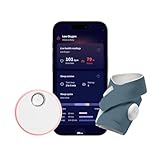
The Dream Sock is the only product here that does not watch the room. It is a wearable that sits on a baby’s foot and reports sleep patterns to an app, giving parents a view of the night in data rather than video. It is designed to be used alongside a video monitor, not instead of one.
It suits parents who already have a camera they trust and want sleep context, families who want a night-by-night record to discuss with a health professional, and households where watching a screen all night increases anxiety rather than reducing it.
Important: the Dream Sock is a general wellness product, not a medical device. It is not intended to diagnose, treat, cure or prevent any condition, and it is not a substitute for medical care or for following safe-sleep guidance. If you have any concern about your baby’s breathing, sleep or wellbeing, contact a paediatrician or other qualified health professional rather than relying on any consumer monitor.
Key specs
- Wearable sock with sensors, paired with a smartphone app
- Reports sleep trends and nightly summaries rather than live video
- No camera, no parent screen and no room audio
- Some advanced history and insight features have historically been tied to a paid app membership – confirm current terms before buying
- Premium tier
Strengths
The case for the Dream Sock is that it answers a different question. A camera tells you what the room looks like; the sock tells you when your baby was asleep, how long the stretches were and how the pattern is changing over weeks. For parents trying to understand whether a rough patch is a regression or a lasting shift, that historical view is more useful than another live feed.
It also reduces screen dependence. Some parents find that a permanent video feed in the corner of the bedroom keeps them awake; a wearable that simply reports in the morning can be calmer. The sock format is designed to stay on through the night, and the app is built around trends rather than alarms, which is the right emphasis for a wellness product.
Pros
- Sleep pattern data that a camera cannot provide
- No screen to watch overnight
- Works alongside any video monitor you already own
- Useful long-term record of sleep changes
- App-centred design keeps the hardware minimal
Cons
- No video, no audio and no room monitoring – it cannot replace a camera
- Requires a wearable to be put on and taken off every night
- Premium tier for a device that does one job
- Some features may sit behind a membership; terms have changed over time
- Not a medical device and must not be treated as one
How it compares
Against Nanit, the split is clear: Nanit is a camera that also reports sleep, Owlet is a sleep tracker with no camera at all. Nanit is the better single purchase for most families; Owlet is the better addition for parents who already own a monitor and want the data layer. Against the Babysense TOUCH 7″, there is no real overlap – Babysense covers rooms, Owlet covers nights.
9. Jartoo Smart Baby Monitor with 2K Camera – Best for Hybrid Local and Remote Viewing

Jartoo’s monitor is the one to look at if your home Wi-Fi is unreliable but you still want phone access. It is a hybrid: a 2K-class camera and 5.5-inch screen that can run over a direct local connection or over Wi-Fi, so a router problem degrades the experience rather than ending it.
It suits parents in older houses with thick walls, families whose router is far from the nursery, and buyers who want higher-than-1080p resolution without moving into the premium tier.
Key specs
- 2K-class camera resolution, above the 1080p standard in this roundup
- 5.5-inch parent screen, larger than the common 5-inch size
- Hybrid connection: switches between Wi-Fi and a direct no-Wi-Fi mode
- Mount included for shelf or wall placement
- Mid-range tier
Strengths
The hybrid connection is the reason to buy this over a plain Wi-Fi camera. Most connected monitors have a single point of failure: if the router, the broadband or the 2.4 GHz band has a bad night, so does your monitoring. A direct local mode keeps the parent screen working regardless, and the app remains available when the network is healthy.
The 2K-class camera and 5.5-inch screen are a small but real step up from the 1080p/5-inch combination that dominates this price band. More resolution helps most at night, where the difference between identifying a shadow and identifying a face matters, and the extra half-inch of screen makes a bedside glance quicker. Note that “2K” is a marketing label rather than a standardised figure, so treat it as “higher than 1080p” rather than a precise measurement.
Pros
- Hybrid Wi-Fi and direct connection reduces dependence on your router
- Higher-resolution camera than most mid-range rivals
- 5.5-inch parent screen is slightly larger than the norm
- Mount included
- Mid-range price for above-average specifications
Cons
- 2K is a broad marketing term, so real-world gains over good 1080p can be modest
- Higher resolution consumes more bandwidth in Wi-Fi mode
- Single camera in the box
- Sleep tracking is not the focus
- Newer brand with a shorter track record than VTech or Philips Avent
How it compares
Against the VTech Smart WiFi Monitor, the trade is resolution and connection resilience versus pan and tilt plus a free-app ecosystem. If your camera position is fixed and your Wi-Fi is shaky, Jartoo is the better buy; if you want to move the view around, VTech wins. Against the Philips Avent Premium Connected, Jartoo offers a hybrid connection and more resolution, while Philips Avent offers a more established brand at a similar tier.
10. HelloBaby 6″ No WiFi Video Baby Monitor – Best Budget Pick with the Longest Battery Claim

The 6-inch HelloBaby is the budget recommendation, and the 30-hour battery claim is the headline. It is a no-Wi-Fi monitor with a larger screen than the 4.3-inch and 5-inch budget units, which makes it the most comfortable of the cheap options to actually live with.
It suits parents who want a big screen, a long battery and no subscription, and who are willing to give up app access to get all three. It is also a sensible choice for a nursery where the router is nowhere near the cot.
Key specs
- 6-inch parent-unit display – larger than the 4.3-inch and 5-inch budget alternatives
- No Wi-Fi, no app, no account
- 30-hour battery claim on the parent unit, the longest stated runtime in this roundup
- Infrared night vision and two-way audio
- Budget tier
Strengths
A 30-hour battery claim changes how you use a monitor. Instead of docking the parent unit every morning out of habit, you can carry it around the house, leave it on the kitchen counter and treat it more like a phone than a fixed appliance. Actual runtime will be shorter with the screen on constantly and at high brightness, but the stated figure is the longest here by a wide margin.
The 6-inch screen is the other practical advantage. Budget monitors often compromise on display size, and a larger screen is exactly the kind of thing you notice every night rather than only when reading a spec sheet. Combined with no Wi-Fi dependency, this is the most livable of the cheap options.
Pros
- 30-hour battery claim – the longest stated runtime in this list
- 6-inch screen, larger than most budget monitors
- No Wi-Fi, no app and no subscription
- Budget tier pricing
- Nothing to secure, because nothing is online
Cons
- No remote viewing from a phone
- No sleep tracking or clip history
- Real battery life depends heavily on brightness and screen-on time
- Fixed camera framing
- No cloud backup if something happens in the room
How it compares
Against the HelloBaby HB6550, the choice is screen size and battery versus a smaller, lighter parent unit. Against the HelloBaby 4.3″, the 6-inch model is the home monitor and the 4.3-inch is the travel one – they are complementary rather than competing. Against the GoodBaby 5″, HelloBaby’s larger screen and battery claim are the differentiators.
11. Philips Avent Premium Connected Baby Monitor – Best for Brand-Name Reliability

Philips Avent’s connected monitor pairs a 1080p camera with a 5-inch HD parent screen and app connectivity, in a package aimed at parents who would rather buy from a long-established nursery brand than from a connected-device startup.
It suits buyers who value a well-known name, straightforward documentation and wide availability of support, and who want a 1080p system with both a dedicated screen and an app.
Key specs
- 1080p camera with a 5-inch HD parent screen
- App connectivity for remote viewing and alerts
- Night vision and two-way audio
- Mid-range tier
- Single camera in the box
Strengths
Philips Avent has been in nurseries for decades, and that shows in the way the product is documented and supported. For a lot of parents, that familiarity is worth more than an extra feature: the manual makes sense, replacement parts and accessories are easy to find, and there is a clear support path if something goes wrong in month eight.
The 1080p/5-inch combination is the same sensible baseline as the VTech and Dr.Care options, and the dual parent-screen-plus-app setup covers both viewing habits. It is a system designed to be understood quickly and used for years rather than to win a spec comparison.
Pros
- Established nursery brand with clear documentation and support
- 1080p camera with a 5-inch HD parent screen
- App connectivity without going premium
- Straightforward setup and familiar controls
- Mid-range tier
Cons
- No pan and tilt
- Single camera only
- No hybrid direct-connection mode
- Sleep tracking is limited
- Fewer standout features than similarly priced rivals
How it compares
Against the VTech Smart WiFi Monitor, the two are close on paper – 1080p, 5-inch screen, app access – and VTech adds pan and tilt while Philips Avent offers brand heritage. Against the Dr.Care VistaView, Dr.Care is the more portable camera thanks to its clip mount, while Philips Avent is the more conventional home install.
12. HelloBaby 4.3″ No WiFi Video Baby Monitor – Best for Small Spaces and Travel

The 4.3-inch HelloBaby is the smallest and lightest monitor here, with the same 30-hour battery claim as its larger sibling and the same no-Wi-Fi approach. It is the one to pack.
It suits travellers, parents who want a monitor on a nightstand that barely takes up space, and households that need a second or third unit without spending much.
Key specs
- 4.3-inch parent-unit display
- No Wi-Fi, no app, no account
- 30-hour battery claim
- Infrared night vision and two-way audio
- Budget tier
Strengths
The 4.3-inch screen is small, and that is the point: the parent unit fits in a bag pocket, a carry-on or a bedside drawer, and it is light enough to leave in a suitcase between trips. The 30-hour battery claim means it will usually last a weekend away without the charger.
Because it is off-network, it also works in places where you would not want to connect a camera to unfamiliar Wi-Fi – a hotel, a rented cottage or a relative’s spare room. There is no login screen standing between you and a working monitor, which at 2 a.m. in an unfamiliar house is worth a lot.
Pros
- Smallest and lightest monitor in this roundup
- 30-hour battery claim for weekend trips
- No Wi-Fi, so it works anywhere with a power socket
- Budget tier, so a spare unit is cheap
- Nothing to configure or log into
Cons
- 4.3-inch screen is small for detailed viewing
- No remote access or sleep tracking
- Fixed camera framing
- Not a substitute for a larger home monitor
- No local recording
How it compares
Against the HelloBaby 6″, this is the travel half of the pair: same brand, same no-Wi-Fi philosophy, smaller screen and easier to carry. Against the HelloBaby HB6550, the 4.3-inch is cheaper and more portable, while the HB6550’s 5-inch screen is a better everyday home display. If you want one monitor for both home and travel and only want to buy once, the 6-inch model is the more versatile compromise.
How to Choose
Baby monitors are one of the few purchases where spending more does not automatically get you a better experience – it gets you a different one. The right questions are about your house, your internet and your tolerance for subscriptions, not about which camera has the biggest number on the box.
Decide the connection model first
Every monitor here is one of three things, and this choice determines everything else:
- Direct-link, no Wi-Fi. A camera and a parent unit talking on their own wireless band. Nothing to hack, nothing to subscribe to, works during outages. You give up remote viewing and sleep data.
- Wi-Fi with an app. Remote viewing, notifications, sleep trends and clip history. You give up independence from your router, and you take on account security as a real responsibility.
- Hybrid. Both modes in one device, as with the Jartoo 2K. The best of both if your Wi-Fi is patchy, at the cost of a slightly
Affiliate disclosure. As an Amazon Associate we earn from qualifying purchases at no extra cost to you. Prices accurate as of the date shown.Best Smart Baby Monitors for Safer SleepCheck price on Amazon